Setting stop loss and take profit through an API
Where stop loss and take profit go for buys and sells on MT4 and MT5, why stops get rejected, how to move them on an open position, and how to trail a stop in code.
A stop loss (SL) closes a position when the price moves against it by a chosen amount. A take profit (TP) closes it when the price moves in its favour by a chosen amount. Both live on the broker’s trade server, so they work even when your program is offline. That makes them the most important safety net an automated strategy has.
They are also the most common reason a first trading bot gets “invalid stops” errors. The rules are simple once you see them: which side of the price each level goes on, which price it is measured from, and how close to the market it may be.
This post covers those rules for MetaTrader 4 (MT4) and MetaTrader 5 (MT5), then shows how to move stops on an open position, how to trail a stop from your own code, and how to check that a change really happened.
Prices or distances
There are two ways to describe a stop:
- An absolute price, such as 1.08200. This is what MetaTrader itself stores.
- A distance from a reference price, such as “20 pips below the entry”. This is how most strategies think.
Inside MetaTrader every stop ends up as an absolute price. If your strategy thinks in distances, something has to convert them, either your code or the API you use. Converting yourself means knowing the symbol’s digits and point size, and rounding to the symbol’s tick size. A stop of 1.082003 on a five-digit symbol is not a valid price. (A point is the smallest quoted price step; on a five-digit EURUSD quote it is 0.00001, and a pip is ten points. See lots, pips and position size for the details.)
Distances are also less ambiguous across brokers. A strategy that says “SL 20 pips” works on any EURUSD quote, while a hard-coded price only works at one moment.
Which side each level goes on
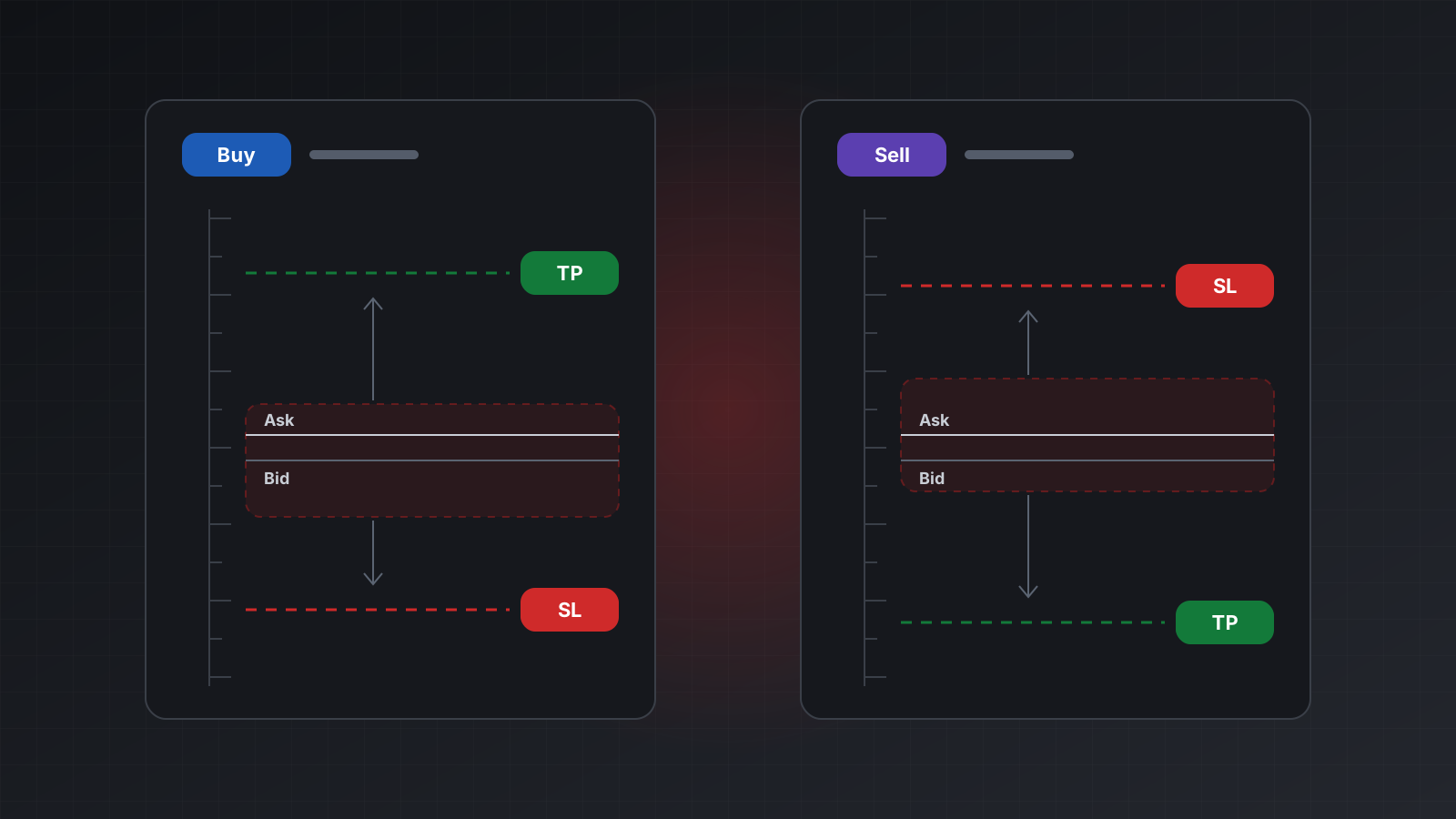
Every symbol has two prices. The bid is what the market pays when you sell. The ask is what you pay when you buy. The gap between them is the spread.
A position closes on the opposite price from the one it opened on. A buy opens at the ask and closes by selling at the bid. A sell opens at the bid and closes by buying at the ask. So stops are compared with the closing price:
| Position | Stop loss | Take profit | Compared with |
|---|---|---|---|
| Buy | Below the price | Above the price | The bid |
| Sell | Above the price | Below the price | The ask |
This has a practical effect. Say EURUSD is bid 1.08440 and ask 1.08452, a spread of 12 points. You buy at 1.08452 and set a stop loss “5 points below the entry” at 1.08447. That stop is above the current bid, so it would trigger at once. The broker refuses it instead. A stop has to clear the spread before it means anything.
For pending orders (orders that wait for a price before they open), the stops are measured from the order’s own open price, since that is where the position will start.
Stops level, freeze level and invalid stops
Brokers add two minimum distances per symbol, both in points. The MQL4 table of trading limits and an MQL5 article on checking trade requests describe them.
- Stops level is the minimum distance between the closing price and a new SL or TP. With a stops level of 30 points, a buy’s stop loss must be at least 0.00030 below the bid and its take profit at least 0.00030 above it.
- Freeze level is a zone around the trigger price where a stop can no longer be changed. If a buy has its stop loss 15 points under the bid and the freeze level is 20, the broker considers the stop about to trigger and refuses any change to it.
Many symbols have both set to zero. Some brokers raise them on volatile symbols or around news. Read them from the symbol’s specification each time rather than hard-coding them.
Using the prices above with a stops level of 30 points:
- A buy’s SL must be at or below 1.08410 and its TP at or above 1.08470.
- A sell’s SL must be at or above 1.08482 and its TP at or below 1.08422.
When a stop breaks a rule, MT5 answers with return code 10016, “invalid stops”, and MT4 with error 130. Nothing changes on the account. The usual causes:
- The stop is on the wrong side, often because buy and sell logic got swapped.
- The stop is measured from the ask on a buy, so the spread pushes it too close.
- The distance is in pips where points were expected, making it ten times too close.
- The stop is inside the stops level or the freeze level.
- The price has too many decimals for the symbol.
- The market moved between reading the price and sending the change.
Trailing a stop from your code
A trailing stop follows the price at a fixed distance as the trade moves in your favour, and never moves back. The MetaTrader terminal has a built-in trailing stop, but it only runs while that terminal is open and it can’t be set through the trading functions. Most bots trail in their own code instead: read the price, work out a new stop, and send a change when it improves enough.
def trail_stop(side: str, bid: float, ask: float, current_sl: float | None,
               trail: float, step: float, min_gap: float, digits: int) -> float | None:
    """New stop price, or None to leave the stop where it is.
    trail: distance to keep, step: smallest move worth sending,
    min_gap: stops level in price units. All in price, not points."""
    gap = max(trail, min_gap)
    if side == "buy":
        target = round(bid - gap, digits)
        if current_sl is None or target >= current_sl + step:
            return target
    else:
        target = round(ask + gap, digits)
        if current_sl is None or target <= current_sl - step:
            return target
    return None

# Buy, bid 1.08600, stop at 1.08300, trail 20 pips, step 5 pips, stops level 30 points.
print(trail_stop("buy", 1.08600, 1.08612, 1.08300, 0.0020, 0.0005, 0.0003, 5))  # 1.084
A few rules keep a trailing loop out of trouble:
- Only ever tighten. For a buy the new stop must be higher than the old one; for a sell, lower.
- Use a step. Sending a change on every tick floods the broker and can get your requests throttled. A step of a few pips is common.
- Respect the minimum distances. Use the larger of your trail and the stops level.
- Skip changes inside the freeze level. The stop is about to trigger anyway.
- Remember the stop stays put when your code stops. If the program crashes, the last stop sent is still on the server, which is why the first stop should always be set when you open.
Checking the result
A change request can be refused, or it can succeed without changing anything (MT5 code 10025, “no changes”, when the new values equal the old ones). Don’t assume. After a change:
- Read the result code. 10009 means done.
- Read the position again and compare its stop loss and take profit with what you sent.
- Log both, along with the bid and ask at the time.
This also catches rounding: if the broker stored 1.08400 when you sent 1.084, the comparison should allow for the symbol’s digits.
Doing this with Tickwire
On Tickwire, stops are set on the order itself through POST /users/current/accounts/<ACCOUNT_ID>/trade,
for MT4 and MT5 accounts alike. Prices are absolute by default. Add stopLossUnits or
takeProfitUnits to give a distance instead, such as RELATIVE_PIPS or RELATIVE_POINTS, and
give the distance as a positive number. Tickwire puts it on the correct side for a buy or a sell:
{
  "actionType": "ORDER_TYPE_BUY",
  "symbol": "EURUSD",
  "volume": 0.10,
  "stopLoss": 20,
  "stopLossUnits": "RELATIVE_PIPS",
  "takeProfit": 40,
  "takeProfitUnits": "RELATIVE_PIPS",
  "clientId": "bot1_a7"
}
For a market order the distance is measured from the price at send time: the ask for a buy, the bid for a sell. For a pending order it is measured from the order’s open price.
To change the stops of an open position, send POSITION_MODIFY with its positionId:
{
  "actionType": "POSITION_MODIFY",
  "positionId": "123456789",
  "stopLoss": 1.08400,
  "takeProfit": 1.08900
}
Leave a field out to keep its current value. Send 0 as an absolute price to remove that level.
Pending orders use ORDER_MODIFY with orderId and openPrice instead. Tickwire checks the side
and the stops level before sending and refuses a bad stop with code 10016 and a message that names
the limit, such as “stop loss 1.08447 must be below 1.0841”. The broker enforces the freeze level.
A trailing loop sends the same request with a new stopLoss. Give each change an
Idempotency-Key built from the position and the new price, so a retry after a timeout can never
apply a different change:
import os
import requests

BASE = "https://api.tickwire.io/users/current/accounts/" + os.environ["TW_ACCOUNT"]
HEAD = {"auth-token": os.environ["TW_KEY"], "content-type": "application/json",
        "X-Actor": "trail-bot", "X-Reason": "trailing stop"}

def move_stop(position_id: str, new_sl: float) -> dict:
    key = f"trail-{position_id}-{new_sl}"
    body = {"actionType": "POSITION_MODIFY", "positionId": position_id, "stopLoss": new_sl}
    return requests.post(f"{BASE}/trade", json=body, headers={**HEAD, "Idempotency-Key": key},
                         timeout=15).json()
The answer has numericCode and an outcome: applied, no_change, rejected or unknown.
Then GET .../positions/<POSITION_ID> shows stopLoss and takeProfit (a level that is not set
is left out). The trading bot guide,
idempotency and the errors reference have more.
Checklist
- Set the first stop loss when you open the position, not in a later request.
- Buy: SL below, TP above, compared with the bid. Sell: mirrored, compared with the ask.
- Read stops level, freeze level, digits and point from the symbol specification.
- Keep pips and points apart.
- Treat 10016 or error 130 as a bug to fix, not something to retry.
- Trail in code with a step, only ever tightening.
- After every change, read the position back and compare.
- Practise on a demo account before you risk money.
Trading carries risk, and you can lose money. This post explains software and how it behaves; it is not investment advice.