Lots, pips and position size, explained
What lots, pips and points mean on MT4 and MT5, how to work out pip value, and how to size a position from a risk amount and a stop distance in Python.
Every order you send to MetaTrader has a size, and the size decides how much money each move in price is worth. Get it wrong by a factor of ten and a normal losing trade becomes a large one. It happens more often than it should, usually because a pip, a point and a tick got mixed up.
This post explains the units MetaTrader 4 (MT4) and MetaTrader 5 (MT5) use for size and price: lots, contract size, pips, points and ticks. Then it shows how to turn “I am willing to lose this much if my stop is hit” into a volume, with a worked example and a short Python function.
How much you risk on a trade is your decision. This post only shows the arithmetic.
Lots and contract size
A lot is MetaTrader’s unit of trade size. The volume field of every order is in lots.
On most currency pairs, one lot is 100,000 units of the base currency (the first currency in the pair, so euros in EURUSD). That number is the symbol’s contract size. Traders use a few names for common sizes:
| Name | Lots | Units on a 100,000 contract |
|---|---|---|
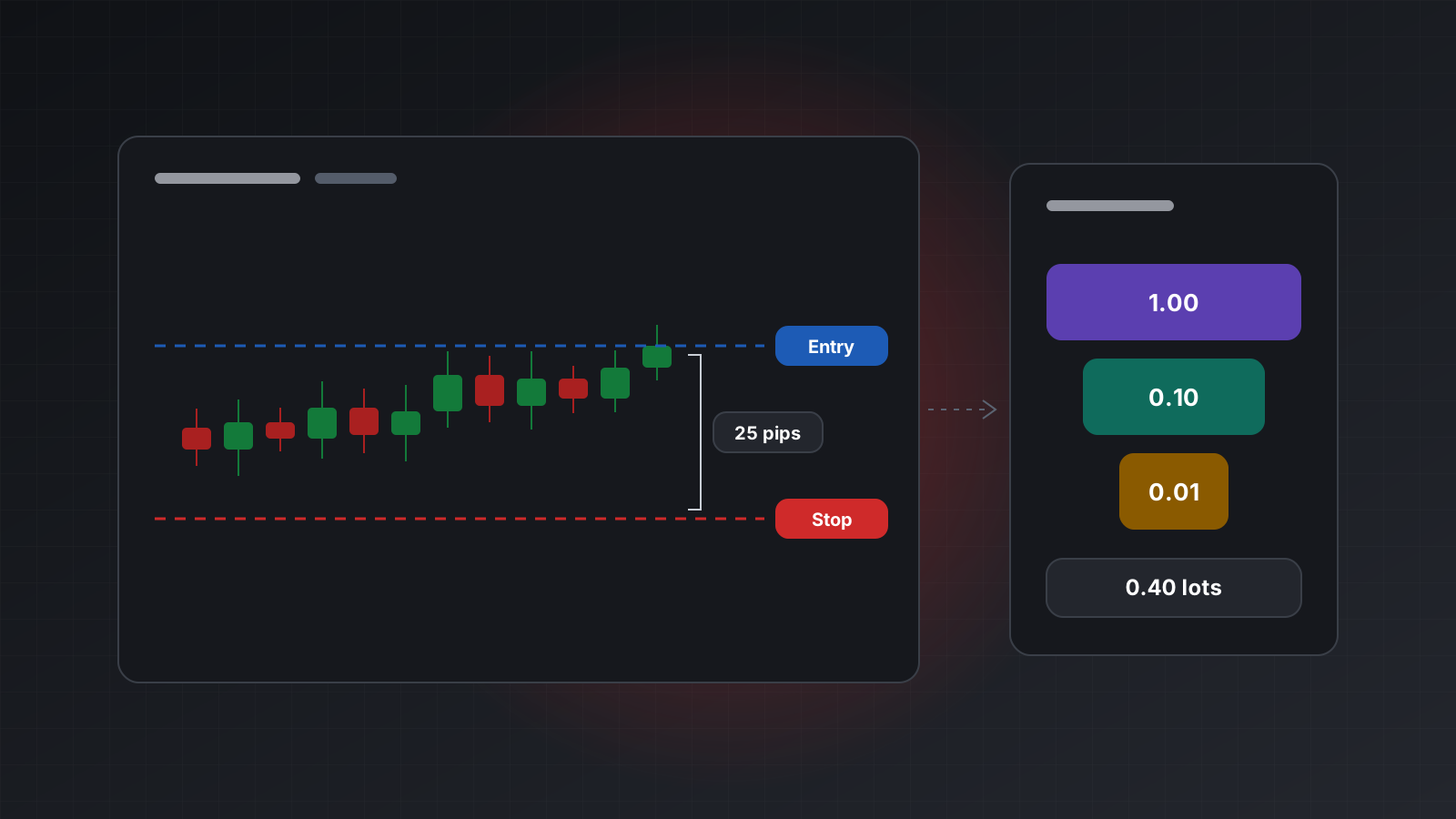
| Standard lot | 1.00 | 100,000 |
| Mini lot | 0.10 | 10,000 |
| Micro lot | 0.01 | 1,000 |
The names only make sense for currency pairs. Other symbols have their own contract sizes, set by the broker. A gold contract is often 100 ounces, an index might be 1 or 10 times the index value, and a crypto symbol might be 1 coin. Never assume 100,000. Read the contract size from the symbol’s specification.
Volume limits and steps
Each symbol also has three volume rules:
- Minimum volume, often 0.01 lots.
- Maximum volume per order.
- Volume step, the increment sizes must follow, often 0.01.
An order for 0.137 lots on a symbol with a step of 0.01 is invalid. The broker refuses it with an “invalid volume” error rather than rounding it for you. So round in your own code, and round down, so the rounded size never risks more than you intended.
Pips, points and ticks
These three words describe price steps, and they are not the same thing.
- A point is the smallest price step a symbol is quoted in. It follows the number of decimal places (the symbol’s digits). On a five-digit EURUSD quote such as 1.08453, one point is 0.00001.
- A pip is the traditional unit for currency moves. On most pairs it is the fourth decimal place, 0.0001. On pairs quoted against the Japanese yen it is the second decimal place, 0.01.
- A tick is the smallest step the price can actually move, the tick size. For most currency pairs it equals one point. For some indices and commodities it is larger, such as 0.25 or 0.5.
Most brokers now quote currency pairs with one extra digit, which is why you see five-digit and three-digit prices:
| Quote | Example | Point | Pip | Points per pip |
|---|---|---|---|---|
| 5-digit | EURUSD 1.08453 | 0.00001 | 0.0001 | 10 |
| 3-digit | USDJPY 151.237 | 0.001 | 0.01 | 10 |
| 4-digit (older) | EURUSD 1.0845 | 0.0001 | 0.0001 | 1 |
This is where the factor of ten comes from. MetaTrader settings such as stops level, freeze level and slippage are in points. Traders talk in pips. A “20 pip stop” is 200 points on a five-digit quote. If your code passes 20 where the field expects points, the stop is ten times closer than you meant.
Pips are a convention for currency pairs. For gold, indices or crypto there is no agreed pip, so work in price units or points instead.
Pip value and tick value
Pip value is how much money one pip is worth for a given size. For one standard lot of EURUSD on an account in US dollars:
pip value = contract size x pip = 100,000 x 0.0001 = 10 USD per lotSo 0.10 lots is worth 1 USD per pip and 0.01 lots is worth 0.10 USD per pip.
That simple sum only works when the second currency of the pair (the profit currency) is the same as your account currency. For USDJPY the profit currency is the yen, so the value of a pip must be converted:
pip value = 100,000 x 0.01 / 151.237 = about 6.61 USD per lotThat value moves as the USDJPY rate moves. Conversions like this are easy to get subtly wrong, which is why MetaTrader works it out for you as the tick value: the money, in your account currency, that one tick is worth for one lot. MT5 even reports two versions, one for a profitable move and one for a losing move, because the conversion rate differs slightly between them.
With tick size and tick value you no longer need to care about pips, currencies or contract types. The same formula works for every symbol:
money per lot for a move of D = D / tick size x tick valueSizing a position from risk and stop distance
Sizing a position means answering one question: what volume makes the loss at my stop equal to the amount I chose to risk?
You need three inputs:
- The risk amount, in account currency. You decide this.
- The stop distance, the price gap between your entry and your stop loss.
- The symbol’s tick size, tick value and volume rules.
Then:
loss per lot = stop distance / tick size x tick value
volume       = risk amount / loss per lot, rounded down to the volume step
A worked example
Say the account is in US dollars and you want to buy EURUSD with a stop 25 pips below your entry. For the example, the risk amount is 100 USD. The symbol specification says:
- tick size 0.00001, tick value 1.00 USD (one lot, one tick),
- minimum volume 0.01, maximum 100, step 0.01.
Step by step:
- Stop distance: 25 pips x 0.0001 = 0.0025 in price.
- Ticks to the stop: 0.0025 / 0.00001 = 250 ticks.
- Loss per lot at the stop: 250 x 1.00 = 250 USD.
- Volume: 100 / 250 = 0.40 lots.
- Round down to the step of 0.01: 0.40 lots.
Check it the long way: 0.40 lots is 40,000 euros, and a 0.0025 move on 40,000 is 100 USD.
Change the stop to 33 pips and the raw answer is 0.303 lots, which rounds down to 0.30. The real risk is then slightly under 100 USD, which is the safe side of the rounding.
When the size is too small
If the raw volume is below the minimum, you can’t place the trade at that risk. Rounding up to the minimum would risk more than you chose. A careful program skips the trade and logs why, rather than silently trading a bigger size.
What the stop distance does not cover
The sum assumes the stop fills exactly at its price. It may not. A stop loss becomes a market order when it is triggered, and in a fast market or over a weekend gap it can fill further away. The spread also matters: a buy closes at the bid, so the bid has to reach your stop. Commission and swap come on top. Treat the result as the loss in normal conditions, not a ceiling.
A Python function for position size
The function below does the arithmetic and the rounding. It is generic: pass in the values from your symbol specification.
import math

def position_size(risk_money: float, stop_distance: float,
                  tick_size: float, tick_value: float,
                  min_volume: float, max_volume: float, volume_step: float) -> float:
    """Volume in lots that loses about risk_money if price moves stop_distance
    against the position. Returns 0.0 if even the minimum volume risks more."""
    if risk_money <= 0 or stop_distance <= 0:
        raise ValueError("risk and stop distance must be positive")
    if tick_size <= 0 or tick_value <= 0:
        raise ValueError("tick size and tick value must be known and positive")

    loss_per_lot = stop_distance / tick_size * tick_value
    raw = risk_money / loss_per_lot

    steps = math.floor(raw / volume_step + 1e-9)  # round down, allow float noise
    volume = round(steps * volume_step, 8)

    if volume < min_volume:
        return 0.0
    return min(volume, max_volume)


# The worked example: 100 USD risk, 25 pip stop on EURUSD.
print(position_size(100, 0.0025, 0.00001, 1.0, 0.01, 100, 0.01))  # 0.4
print(position_size(100, 0.0033, 0.00001, 1.0, 0.01, 100, 0.01))  # 0.3
Two details are deliberate. The small 1e-9 stops floating point noise from turning 40.0 steps
into 39.999 and losing a step. The final round turns 0.30000000000000004 into 0.3, so the
volume you send is clean.
Use the tick value for a losing move when the platform gives you one, because the stop loss is a losing move. Read the values close to the time of the trade, since tick value changes whenever the profit currency differs from the account currency.
Doing this with Tickwire
On Tickwire the inputs come from two calls, for MT4 and MT5 accounts alike:
GET /users/current/accounts/<ACCOUNT_ID>/symbols/EURUSD/specificationreturnscontractSize,tickSize,point,digits,minVolume,maxVolumeandvolumeStep, pluspipSizefor currency pairs.GET /users/current/accounts/<ACCOUNT_ID>/symbols/EURUSD/current-pricereturnsbid,ask,profitTickValueandlossTickValue, in the account currency for one lot.
import os
import requests

BASE = "https://api.tickwire.io/users/current/accounts/" + os.environ["TW_ACCOUNT"]
HEAD = {"auth-token": os.environ["TW_KEY"]}

spec = requests.get(f"{BASE}/symbols/EURUSD/specification", headers=HEAD, timeout=10).json()
price = requests.get(f"{BASE}/symbols/EURUSD/current-price", headers=HEAD, timeout=10).json()

volume = position_size(100, 25 * spec["pipSize"], spec["tickSize"], price["lossTickValue"],
                       spec["minVolume"], spec["maxVolume"], spec["volumeStep"])
Broker symbol names can carry a suffix, so list them with GET .../symbols first. An order whose
volume breaks the symbol’s rules comes back rejected with an invalid volume code, and nothing
reaches the market. Tickwire has no built-in size or loss limits: those rules belong in your code,
or in a pre-trade hook if an AI agent places the orders.
The quickstart shows a first order end to end, and MT4 and MT5 lists the few differences between the platforms.
Key points
volumeis in lots, and a lot is the symbol’s contract size, which is not always 100,000.- A point is the smallest quoted step, a pip is a currency convention, a tick is the smallest real move. On five-digit and three-digit quotes, one pip is ten points.
- Settings like stops level and slippage are in points, not pips.
- Pip value depends on the profit currency. Tick value already converts it to your account currency.
- Volume = risk amount / (stop distance / tick size x tick value), rounded down to the step.
- If the result is below the minimum volume, skip the trade instead of rounding up.
- A stop can fill beyond its price, so the risk amount is a normal case, not a limit.
- Practise on a demo account before you risk money, and check the size of every trade your code sends.
Trading carries risk, and you can lose money. This post explains software and how it behaves; it is not investment advice.