Market hours, weekends and gaps for trading bots
When forex and other MetaTrader symbols trade, what weekend gaps do to stops, why spreads widen at rollover, and what a trading bot should do when the market is closed.
A trading bot doesn’t get tired, so it is tempting to think of the market the same way. It isn’t always open. Currency pairs close every weekend, many symbols pause every day, and holidays thin things out even when prices are still moving.
Bots that ignore this fail in predictable ways. They send orders into a closed market and loop on the errors. They trade on a price that is two days old. They hold a position over the weekend and find their stop filled far beyond where it was set.
This post covers when markets are open, how MetaTrader 4 (MT4) and MetaTrader 5 (MT5) describe trading hours, what gaps and rollover do to prices, and a short list of things a bot should check before it trades.
When the forex market is open
Spot currency trading has no single exchange. It moves around the world with the business day, so it trades around the clock from Monday to Friday. The trading week runs roughly from Sunday evening to Friday evening, New York time. Most brokers follow that, with small differences of their own.
Within the week, traders talk about four overlapping sessions, named after the financial centres that are awake at the time:
| Session | Rough local hours | What it is like |
|---|---|---|
| Sydney | 7 a.m. to 4 p.m. Sydney | Quiet, opens the week |
| Tokyo | 9 a.m. to 6 p.m. Tokyo | Active in yen and Asia-Pacific pairs |
| London | 8 a.m. to 5 p.m. London | The busiest single centre |
| New York | 8 a.m. to 5 p.m. New York | Busy, especially while London is still open |
The hours are conventions, not rules, and they shift with daylight saving time in each city. What matters for a bot is the pattern: liquidity and volatility are highest when London and New York overlap, and lowest late in the New York afternoon and early in the Asian morning.
Other symbols keep their own hours. Stock indices and single shares follow their exchange, often with a daily break. Metals and energy usually pause for about an hour each day. Crypto symbols at some brokers trade at weekends too. Never assume a symbol keeps forex hours.
Trading sessions inside the terminal
MetaTrader stores hours per symbol and per weekday, as quote sessions (when prices arrive) and trade sessions (when orders are accepted). The two can differ: a symbol may show prices for a few minutes before it accepts orders. In MQL these come from SymbolInfoSessionTrade.
The session times are usually on the broker’s server clock, which is rarely UTC. Many brokers set it to UTC+2 in winter and UTC+3 in summer, so that the daily close at 5 p.m. New York falls at midnight on the server. If you compare session times with your own clock, convert first. See broker time is not UTC for how to do that safely.
The symbol also has a trade mode, which says whether trading is fully allowed, limited to closing positions, or disabled. A symbol can be inside its session and still not tradable.
Weekend gaps
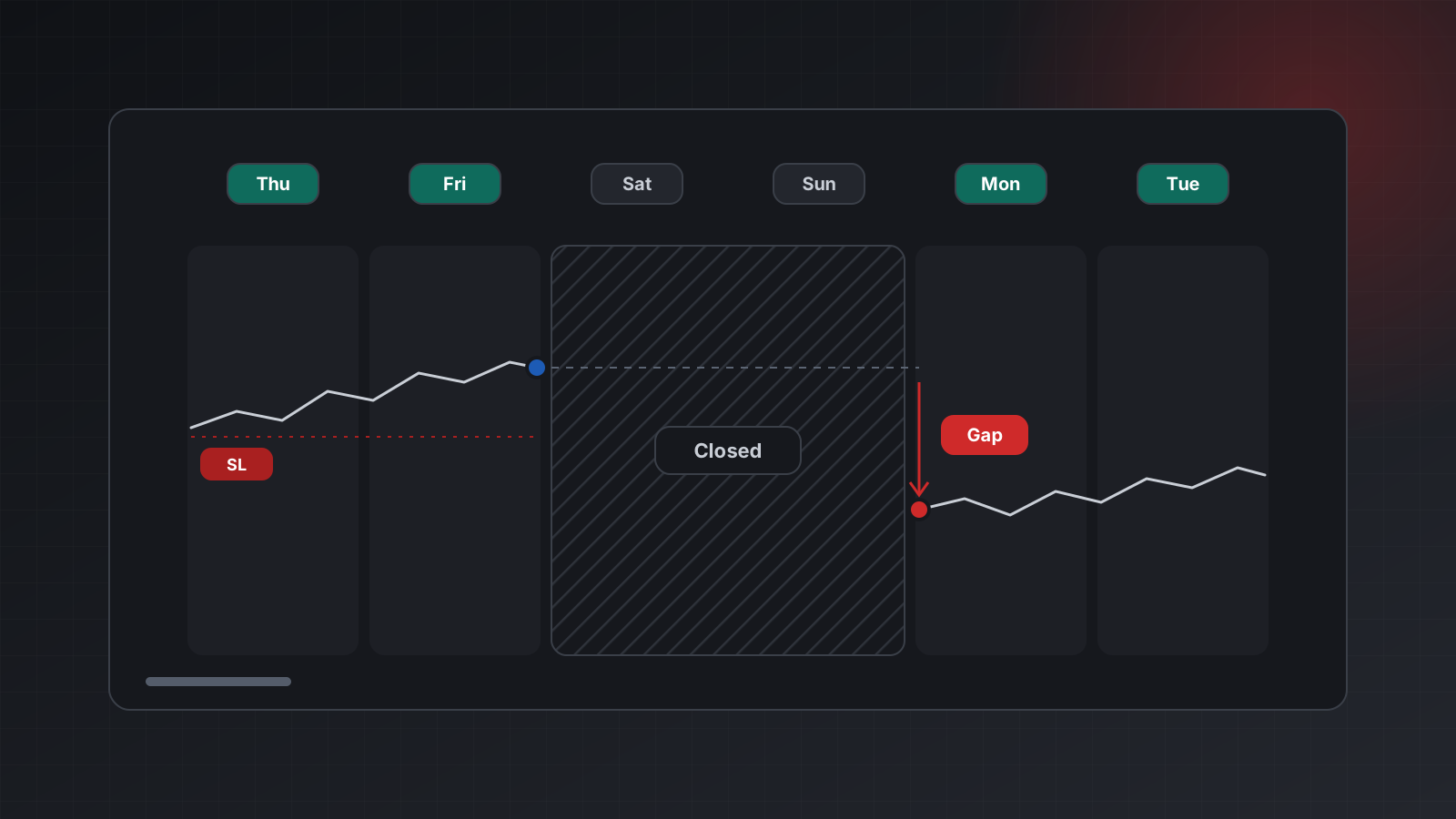
A gap is a jump in price between two consecutive quotes, with no trading in between. The largest gaps usually come at the weekly open. News keeps happening over the weekend, and the first price on Sunday evening reflects all of it at once.
A gap matters most for orders that rest on the server:
- Stop losses. A stop is a trigger, not a promised price. If a buy has its stop at 1.08300 and the market opens at 1.08100, the stop triggers at the open and fills at the first available price, around 1.08100. The loss is 20 pips larger than planned.
- Pending stop orders. A buy stop above Friday’s close can fill well above its price if the market gaps up through it.
- Limit orders. A limit order can fill at a better price than its level, since the market jumped past it.
Gaps happen on weekdays too, around major news or on symbols with a daily break, but the weekend gap is the one every bot that holds positions over the weekend has to plan for. The choice is yours: close before Friday’s end, reduce size, or hold and accept that the stop may fill further away. What matters is that the choice is deliberate.
Holidays, thin liquidity and rollover
Some hours are open but unhealthy.
- Holidays. Around Christmas and New Year, and on national holidays in major centres, many participants are away. Brokers often shorten sessions for symbols tied to those markets. Spreads widen and prices can move erratically on little volume.
- The weekly open. The first hour after Sunday’s open is thin. Spreads can be several times their normal width.
- Rollover. Around 5 p.m. New York, the daily cut-off, liquidity providers pause briefly and spreads widen sharply for a few minutes. It is also when swap is applied: the interest charge or credit for holding a position overnight. On one day a week, often Wednesday for currency pairs, the swap counts three days to cover the weekend.
A spread is the gap between the bid (the selling price) and the ask (the buying price). A bot that opens trades at rollover pays a far wider spread than its backtest assumed, and a tight stop can be hit by the spread alone.
What a trading bot should do
A few rules handle almost every case:
- Don’t send orders when the symbol is closed. Check the trade mode and, when you have them, the trade sessions.
- Handle “market closed” as a refusal. MT5 reports it as return code 10018. Nothing was traded. Wait for the next session instead of retrying in a loop.
- Check the age of the last price. If the newest tick is minutes or days old, the market is closed or the feed is stuck. Either way, don’t trade on it.
- Avoid the thin minutes. Many strategies skip the first period after the weekly open and the minutes around rollover.
- Plan the Monday open. Decide in advance what happens to open positions over the weekend. When trading resumes, wait for fresh ticks and a normal spread before acting, then check the positions you actually hold.
A small helper covers rules 1 and 3. It takes the symbol’s trade sessions, the current broker time
and the time of the last tick, and answers True, False or None when it can’t tell:
from datetime import datetime, timezone

def can_trade(trade_sessions: dict | None, broker_time: str | None,
              last_tick_utc: str | None, max_age_s: float = 60) -> bool | None:
    """trade_sessions: {"MONDAY": [{"from": "00:05:00.000", "to": "23:55:00.000"}], ...}
    broker_time: "YYYY-MM-DD HH:mm:ss.SSS" on the broker clock.
    last_tick_utc: ISO time ending in Z."""
    if last_tick_utc:
        tick = datetime.fromisoformat(last_tick_utc.replace("Z", "+00:00"))
        if (datetime.now(timezone.utc) - tick).total_seconds() > max_age_s:
            return False                      # stale price: closed or stuck
    if not trade_sessions or not broker_time:
        return None                           # no session data: unknown
    now = datetime.strptime(broker_time[:19], "%Y-%m-%d %H:%M:%S")
    day, clock = now.strftime("%A").upper(), now.strftime("%H:%M:%S")
    return any(w["from"][:8] <= clock <= w["to"][:8] for w in trade_sessions.get(day, []))
Note the None. Without session data or a fresh price, the honest answer is “unknown”, and a
careful bot treats unknown as “don’t open new trades”.
Doing this with Tickwire
On Tickwire, the pieces come from a few calls that work for MT4 and MT5 accounts alike:
GET /users/current/accounts/<ACCOUNT_ID>/server-timereturnstime(UTC),brokerTimeon the broker clock, andbrokerUtcOffsetSeconds. The offset is measured from live ticks and isnulluntil it has been measured. It is never assumed to be zero.GET .../symbols/<SYMBOL>/specificationhas the symbol’stradeModeand swap settings. Where the platform reports them, it also hastradeSessionsandquoteSessionsby weekday. When they are not reported, they are left out rather than guessed.GET .../healthhasprices_liveandlast_tick_age_s.prices_liveisfalsewhen no Market Watch symbol moved in the last 30 seconds, and the dashboard then says the market is likely closed.
Tickwire keeps no market calendar and doesn’t guess from the day of the week whether a market is
open. An order sent into a closed market comes back rejected with the broker’s code, and nothing
reaches the market. More in time zones, health and the
trading bot guide.
Checklist
- Know your symbols’ hours. Forex trades roughly Sunday evening to Friday evening New York time; other symbols differ.
- Read session times on the broker clock, and convert with a measured offset, never an assumed one.
- Check the trade mode and the age of the last tick before every new order.
- Treat “market closed” as a refusal, not something to retry.
- Expect wide spreads at the weekly open, at rollover and on holidays.
- Decide what happens to open positions over the weekend, and remember stops can fill beyond their price at the open.
- Practise on a demo account before you risk money.
Trading carries risk, and you can lose money. This post explains software and how it behaves; it is not investment advice.