Broker server time is not UTC
Why MetaTrader servers often run on UTC+2 in winter and UTC+3 in summer, how that shifts candles, deals and daily loss limits, and how to convert broker time correctly.
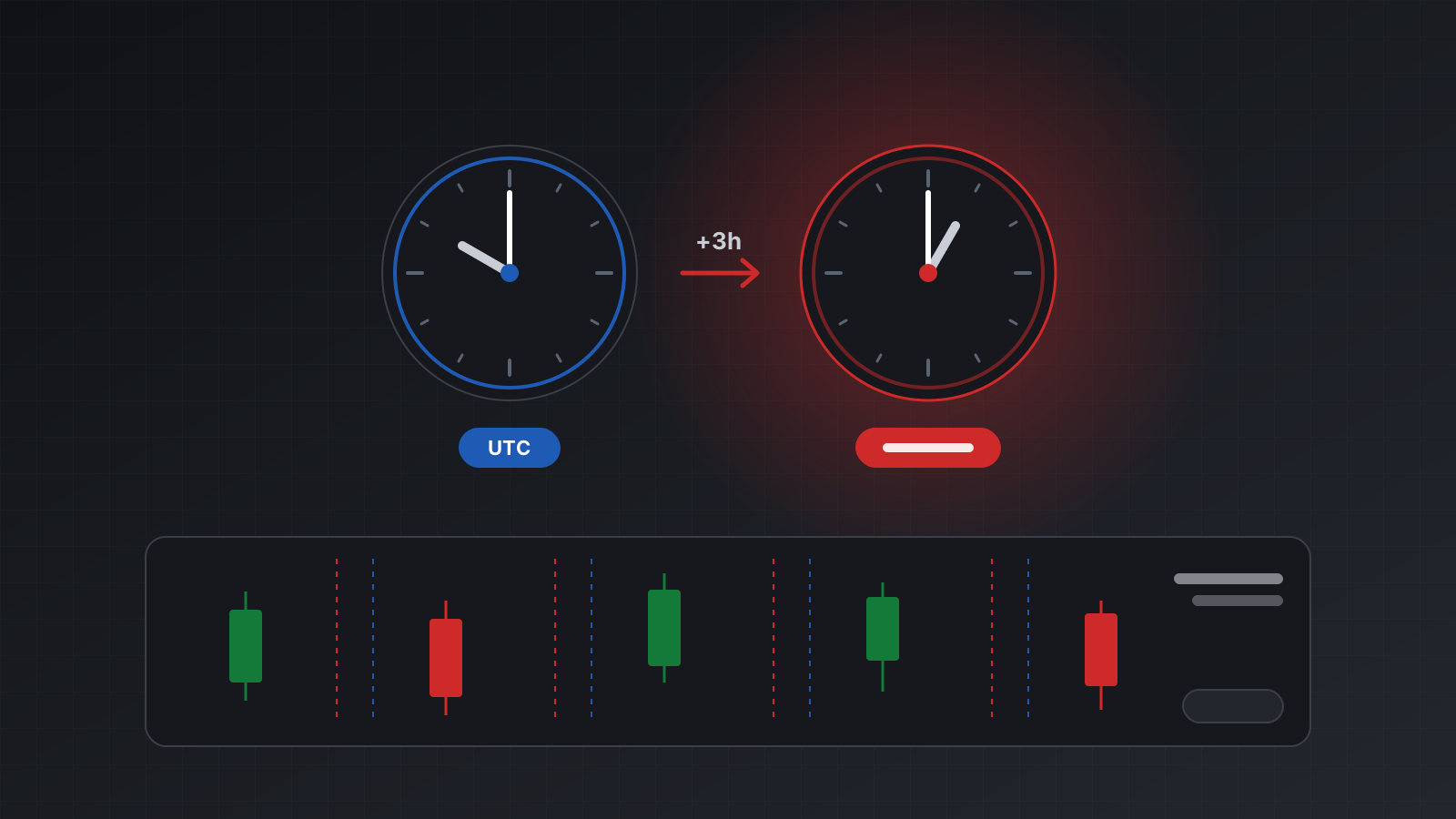
Every MetaTrader server keeps its own clock. Candles, ticks, deals and order times from the terminal are stamped with that clock, not with UTC and not with your computer’s time zone. On many servers the clock runs two hours ahead of UTC in winter and three hours ahead in summer.
If your code treats those times as UTC, everything shifts by two or three hours. A daily loss limit resets at the wrong moment. A “London open” filter fires in the middle of the morning. Two data sources that should line up don’t.
This post explains why servers do this, where it bites, and how to convert correctly on MT4 and MT5.
Why so many servers use UTC+2 and UTC+3
Forex trades around the clock from Sunday evening to Friday evening. Many traders treat 5 p.m. New York time as the end of the trading day, a convention often called “New York close”.
A common way to set a server clock is to make 5 p.m. in New York land on exactly midnight on the server. New York is UTC-5 in winter, so the server runs at UTC+2. In the US summer, New York moves to UTC-4, so the server moves to UTC+3. Put another way, server time is New York time plus seven hours, all year.
The payoff is tidy charts. With midnight at New York close, every trading week has exactly five daily candles, Monday to Friday. A server on plain UTC gets a small sixth candle for the few hours of trading on Sunday evening, which distorts daily indicators.
But this is a convention, not a standard. Servers you will meet in practice include:
| Server clock | Winter | Summer | Switch dates |
|---|---|---|---|
| New York close | UTC+2 | UTC+3 | US dates: second Sunday in March, first Sunday in November |
| European rule | UTC+2 | UTC+3 | EU dates: last Sunday in March, last Sunday in October |
| Fixed offset | UTC+2 or UTC+3 | Same | Never |
| Plain UTC | UTC+0 | UTC+0 | Never |
The first two rows look the same for most of the year. They differ for two or three weeks each spring and about a week each autumn, when the US and Europe have changed clocks on different dates. That gap is where hand-coded offsets quietly go wrong.
Where wrong times cause real damage
Daily limits and trading days
Prop firms (companies that fund traders under strict rules) usually reset daily loss limits at the server’s midnight, not at UTC midnight. If your risk code decides which day a deal belongs to using UTC, a loss at 23:30 UTC on a summer Monday counts toward Monday, while the firm’s server, where it is already 02:30 on Tuesday, counts it toward Tuesday. Your tool and the firm’s dashboard now disagree about how much room you have left.
Session filters
A filter like “only trade between 08:00 and 12:00 London time” has to be written in London time, then converted. London open is 10:00 on a UTC+2 server in winter. In summer, London is UTC+1 and the server is UTC+3, so London open is still 10:00. But during the gap weeks, when one side has changed clocks and the other hasn’t, it lands an hour off. Hard-coding “10:00 server time” breaks twice a year.
Joining data
Candles from the terminal, an economic calendar in UTC, and fills from your own logs in local time will only line up after you convert all three to one zone. A shift of two or three hours is small enough to look plausible and large enough to ruin a backtest.
What the terminal actually gives you
In MQL, TimeCurrent() returns the last known server time, formed on the trade server and independent of your computer’s settings (TimeCurrent in the MQL5 reference). TimeGMT() gives UTC, computed from your computer’s clock. The difference between the two is the server’s current offset.
The official MetaTrader 5 Python library returns bar and tick times as Unix timestamps. Its documentation describes them as stored in UTC “without the shift” (copy_rates_from). The practical meaning: the number counts the server’s wall clock, with no time zone correction applied. You can check this yourself. Daily candles open at 00:00 by that timestamp, which is the server’s midnight, not UTC’s.
So a timestamp from the terminal is not a UTC instant until you subtract the offset that was in force at that moment.
Converting broker time correctly
There are two safe approaches.
Measure the offset. Compare the server’s time with UTC at the same instant, and round to the nearest 30 minutes so that small delays in tick times don’t matter. Only do this while ticks are fresh: a stale TimeCurrent() at the weekend gives a meaningless offset.
Model the rule. If you know the server follows New York close, you don’t need a table of offsets. Server time is New York time plus seven hours, and Python’s zoneinfo module already knows New York’s daylight-saving rules:
from datetime import datetime, timedelta, timezone
from zoneinfo import ZoneInfo

NEW_YORK = ZoneInfo("America/New_York")

def broker_to_utc(broker_wall: datetime) -> datetime:
    """For a server on New York close (UTC+2 winter, UTC+3 summer)."""
    ny_wall = broker_wall - timedelta(hours=7)
    return ny_wall.replace(tzinfo=NEW_YORK).astimezone(timezone.utc)

def utc_to_broker(utc: datetime) -> datetime:
    return utc.astimezone(NEW_YORK).replace(tzinfo=None) + timedelta(hours=7)

def trading_day(utc: datetime):
    """The server's trading day for a UTC instant, as daily limits count it."""
    return utc_to_broker(utc).date()

print(broker_to_utc(datetime(2026, 1, 15, 10, 0)))   # 2026-01-15 08:00:00+00:00
print(broker_to_utc(datetime(2026, 7, 15, 10, 0)))   # 2026-07-15 07:00:00+00:00
The zoneinfo documentation covers the details. Two cautions:
- Confirm the rule before you use it. The model is only right for servers that actually follow New York close. Check the measured offset on dates in both halves of the year, including a gap week.
- Use the offset of the moment, not of today. Converting last January’s deals with today’s summer offset is off by an hour. A single “current offset” is fine for live prices and wrong for history.
Never assume the offset is zero when you don’t know it. Missing is missing; record it as unknown and refuse to compute daily limits until you have it.
Checklist
- Treat every time from the terminal as server time until proven otherwise.
- Find the server’s rule: New York close, European dates, fixed, or UTC.
- Measure the offset only while ticks are fresh, rounded to 30 minutes.
- Convert history with the offset in force at each moment, not today’s.
- Count daily limits by the server’s trading day, which is usually what a prop firm uses.
- Write session filters in the session’s own zone and convert, never as fixed server hours.
- Test around the March and October to November clock changes.
- Practise on a demo account before you risk money, and compare your day boundaries with what the terminal shows.
Doing this with Tickwire
Tickwire labels every time. Fields named time are UTC with a Z. Fields named brokerTime are broker-local, formatted YYYY-MM-DD HH:mm:ss.SSS, and never carry a Z. Broker server time is never assumed to be UTC.
GET /users/current/accounts/{id}/server-time returns both clocks and brokerUtcOffsetSeconds. The offset is measured, not guessed: broker tick time minus UTC, rounded to 30 minutes, only while ticks are fresh. Until it has been measured, the field is null. The account snapshot carries the same clock as brokerUtcOffsetMinutes.
- Time zones and broker time has the field rules and how the daylight-saving rule is worked out.
- Health shows the snapshot’s
server_timesection. - The prop risk tool guide counts daily limits by the broker’s day.
Trading carries risk, and you can lose money. This post explains software and how it behaves; it is not investment advice.