Candles and timeframes from an MT5 API
OHLCV candles from MT4 and MT5 explained: timeframes from M1 to MN1, the forming candle, broker time in timestamps, gaps, paging long ranges and tick volume.
Almost every trading strategy starts from candles. A moving average, a breakout level, a volatility filter: all of them read a table of bars. Fetching that table looks like the easiest call in any trading API. It is also where many quiet bugs come from: an unfinished bar treated as final, a timestamp read as UTC when it isn’t, or a weekend gap taken for missing data.
This post explains what a candle from MetaTrader 4 (MT4) or MetaTrader 5 (MT5) really contains, which timeframes exist, and how to load a long history into pandas without fooling yourself about time zones. The examples use Tickwire’s REST API, but the traps are the same with any source of MetaTrader data.
What is in a candle
A candle (or bar) sums up all the price changes in one time slot. The usual name for its contents is OHLCV:
- Open: the first price in the slot.
- High and low: the highest and lowest prices in the slot.
- Close: the last price. For the bar that is still forming, this is simply the latest price so far.
- Volume: how much trading happened. MetaTrader has two kinds, explained at the end of this section.
MetaTrader builds bars from the bid price (the price you can sell at) for most forex and CFD symbols. The ask is higher by the spread, so a buy stop placed exactly at a candle’s high can still fill, or fail to fill, in ways the chart doesn’t show. Some MT5 symbols traded on an exchange build bars from the last trade price instead. MT5 bars can also carry a spread value in points. Treat it as a rough guide, not as the spread you would have paid.
Each candle from the API looks like this:
{ "symbol": "EURUSD", "timeframe": "1h",
  "time": "2026-10-20T06:00:00.000Z", "brokerTime": "2026-10-20 09:00:00.000",
  "open": 1.08412, "high": 1.08490, "low": 1.08377, "close": 1.08455,
  "tickVolume": 3120, "spread": 6 }
The time is the moment the bar opened, not when it closed.
MetaTrader reports two kinds of volume:
- Tick volume (
tickVolume) counts how many price changes happened in the bar. For forex and most CFDs this is the only volume there is, since no central exchange reports traded amounts. It is still a useful activity measure: busy bars have more ticks. - Real volume (
volume) is the traded amount, and appears only on MT5 symbols where the broker passes on exchange data. For most forex symbols the field is simply absent.
Tick volume depends on the broker’s price feed. Two brokers can show very different tick counts for the same hour, so don’t compare raw tick volume across accounts.
Timeframes from M1 to MN1, and MT4 limits
A timeframe is the length of each bar. MT5 offers 21 of them: M1, M2, M3, M4, M5, M6, M10, M12, M15, M20, M30, H1, H2, H3, H4, H6, H8, H12, D1, W1 and MN1 (one month). In Tickwire’s API they are written 1m, 2m up to 30m, then 1h to 12h, 1d, 1w and 1mn.
MT4 has only nine: M1, M5, M15, M30, H1, H4, D1, W1 and MN1. Ask an MT4 account for 2h and you get the error not_supported_on_mt4. If you need a two-hour bar on MT4, load H1 and merge pairs of bars yourself, starting each pair at a broker-time hour your strategy chooses.
Three timeframes behave differently from the rest:
- D1 starts at the broker’s midnight, not UTC midnight. A daily bar on one broker covers different hours from a daily bar on another.
- W1 is dated at the start of the broker’s week, usually a Sunday, even when trading only begins later, so the bar’s time is not its first trade.
- MN1 is a calendar month, so its length changes from bar to bar.
MT4 has a few more limits. It has no real volume. It can’t return tick history, so the ticks endpoint answers not_supported_on_mt4 rather than empty data. Candles, current candles and paging work the same as on MT5.
The forming candle and closed candles
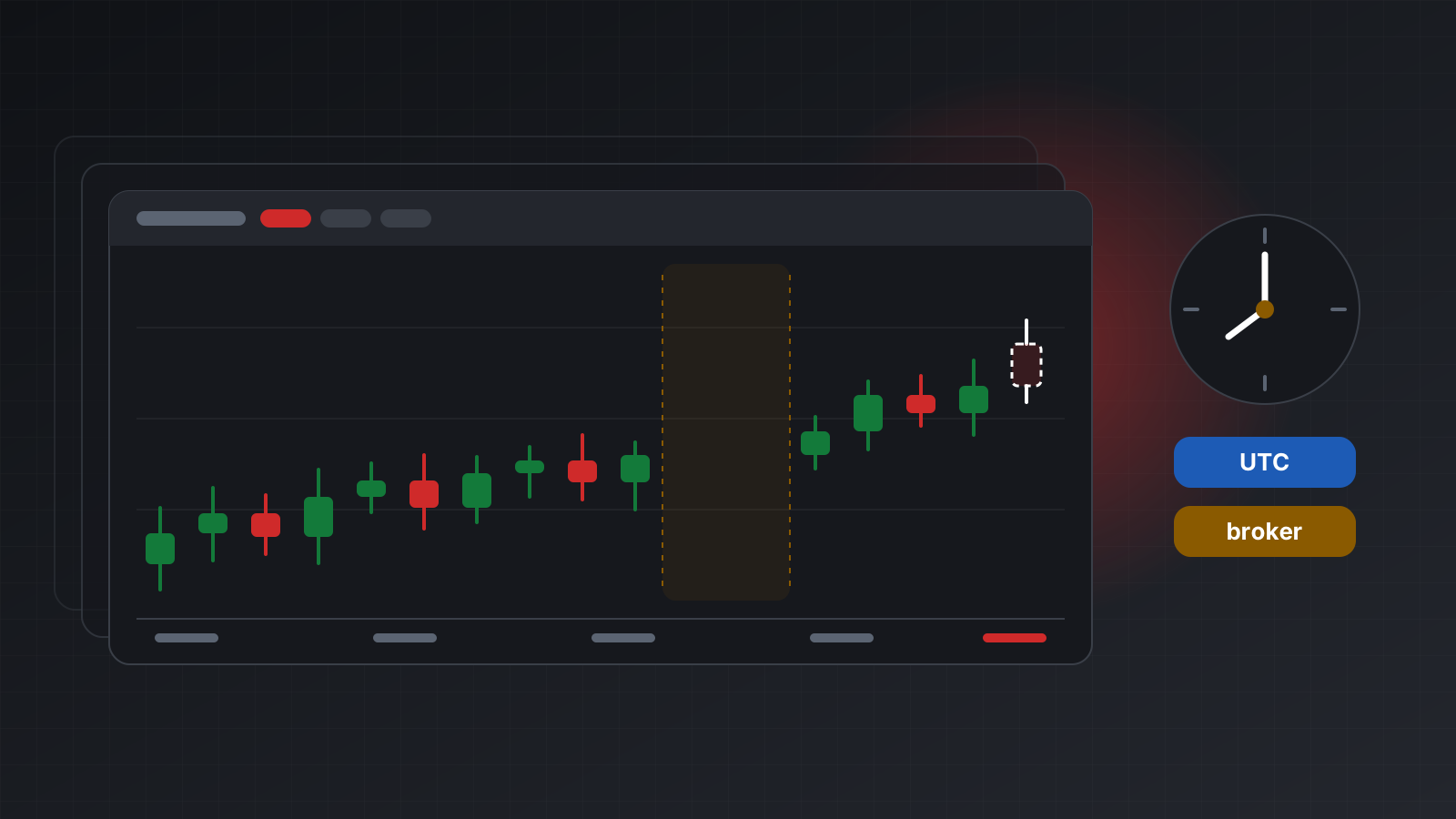
The newest bar is normally still forming: it has an open, but its high, low and close keep changing until its time slot ends. A strategy that treats it as closed sees a different chart every time it looks.
When you ask for the latest candles without a start time, the last item is usually the forming one. You can fetch the forming bar on its own as well:
GET /users/current/accounts/<ACCOUNT_ID>/symbols/EURUSD/current-candles/1hThe safe pattern is to compare the two. If the last candle of your history has the same brokerTime as the current candle, drop it before calculating signals. Decide on closed bars, then act once per new bar. If you do want intrabar logic, label it clearly in your code so nobody mistakes it for bar-close logic later.
Broker time in candle timestamps
MetaTrader servers keep their own clock. Many run at UTC+2 in winter and UTC+3 in summer, but not all, and the switch dates follow one country’s rules or another’s. Bars are cut on that broker clock. That is why each candle carries two times:
timeis UTC, written with aZ.brokerTimeis the broker’s wall clock, written without any zone, because it isn’t UTC.
The UTC value depends on knowing the broker’s offset. Tickwire measures it from live ticks and never guesses, so on a new account the offset can be unknown for a while. Until then time may be missing, and a request with a startTime (which is UTC) answers broker_time_unknown because it can’t be translated safely. brokerTime is always there.
In practice: use brokerTime to decide which trading day a bar belongs to, and use time to line bars up with anything else in UTC, such as news, other data feeds or your logs. Broker server time is not UTC explains the offset and its traps in more depth.
Gaps, and why they are normal
MetaTrader creates a bar only when at least one tick arrived in its slot. A quiet minute at 3 a.m. has no M1 bar at all. The weekend has no bars. A holiday or a broker’s daily break leaves a hole too. So a list of candles is not evenly spaced, and code that assumes “the bar before this one is exactly one hour earlier” will be wrong.
Don’t fill gaps with made-up bars unless your method truly needs a regular grid, and if you fill them, mark the filled rows. Indicators such as a 20-bar average already count bars, not hours, which is what traders using the chart see too. See market hours, weekends and gaps for trading bots.
The broker also decides how much history exists. Old M1 data is often limited. When you ask for more than the broker holds, you simply get fewer candles back, so always check how many you received.
Paging long ranges into pandas
One request returns at most 1,000 candles. They come back oldest first, ending with the bar that opened at or before your startTime, or the latest bar if you leave it out. To load more, page backwards: ask again with a startTime just before the oldest bar you have.
History requests are heavier than normal reads. On Tickwire each costs 5 units of your rate limit, and an account allows 5 history requests at the same time; more get 429 with a Retry-After header. Load pages one after another, not all at once.
This loader pages backwards, drops the forming bar, and labels time honestly:
import time
import pandas as pd
import requests

API = "https://api.tickwire.io"
ACC = "<ACCOUNT_ID>"
H = {"auth-token": "tw_live_..."}
BASE = f"{API}/users/current/accounts/{ACC}"

def get(path: str, **params):
    while True:
        r = requests.get(BASE + path, headers=H, params=params, timeout=30)
        if r.status_code == 429:                       # too many history requests
            time.sleep(float(r.headers.get("Retry-After", "1")))
            continue
        r.raise_for_status()
        return r.json()

def load_candles(symbol: str, tf: str, pages: int = 5) -> pd.DataFrame:
    path = f"/historical-market-data/symbols/{symbol}/timeframes/{tf}/candles"
    rows, start = [], None
    for _ in range(pages):
        params = {"limit": 1000} | ({"startTime": start} if start else {})
        batch = get(path, **params)
        rows = batch + rows                            # older pages go in front
        if len(batch) < 1000 or not batch[0].get("time"):
            break                                      # no more history, or UTC unknown
        oldest = pd.Timestamp(batch[0]["time"]) - pd.Timedelta(milliseconds=1)
        start = oldest.strftime("%Y-%m-%dT%H:%M:%S.%f")[:-3] + "Z"

    df = pd.DataFrame(rows).drop_duplicates("brokerTime").sort_values("brokerTime")
    df["broker_time"] = pd.to_datetime(df["brokerTime"])   # naive on purpose: not UTC

    forming = get(f"/symbols/{symbol}/current-candles/{tf}")
    df = df[df["brokerTime"] != forming["brokerTime"]]      # keep closed bars only

    if "time" in df and df["time"].notna().all():
        df.index = pd.to_datetime(df["time"], utc=True).rename("time_utc")
    else:
        df.index = df["broker_time"].rename("broker_time")  # say so, don't pretend
    return df[["broker_time", "open", "high", "low", "close", "tickVolume"]]

bars = load_candles("EURUSD", "1h")
print(bars.index.name, len(bars))
gaps = bars["broker_time"].diff() > pd.Timedelta(hours=1)
print(bars.loc[gaps, "broker_time"].tail())            # weekends and quiet spells
Some details worth noticing:
- The index name says which clock it uses. A UTC index is time-zone aware; a broker-time index is deliberately naive and named
broker_time, so it can never be mixed up with UTC by accident. - Duplicates are dropped on
brokerTime, because paging boundaries can overlap by one bar. - The gap check uses broker time, so you can see that the big gaps line up with the broker’s weekend.
Doing this with Tickwire
Tickwire runs one real MT4 or MT5 terminal per account and serves its candles through the same REST routes for both platforms, with UTC time and brokerTime on every bar. Broker time is labelled as broker time and never assumed to be UTC. To follow the forming bar live, subscribe to candles on the WebSocket stream instead of polling.
- Time zones shows how the broker offset is measured and read.
- MT4 and MT5 lists the timeframes and features each platform supports.
- MT5 from Python covers using these routes from Python on any operating system.
Practise on a demo account before you risk money, and check your loaded bars against the terminal’s own chart once before trusting a backtest built on them.
Trading carries risk, and you can lose money. This post explains software and how it behaves; it is not investment advice.